The six states of "done": why AI agents say they finished when they didn't
WhatsApp shows three ticks and nobody gets confused. AI agents show one "Done" for six different states. Here is the ladder I use to check what an agent actually finished.
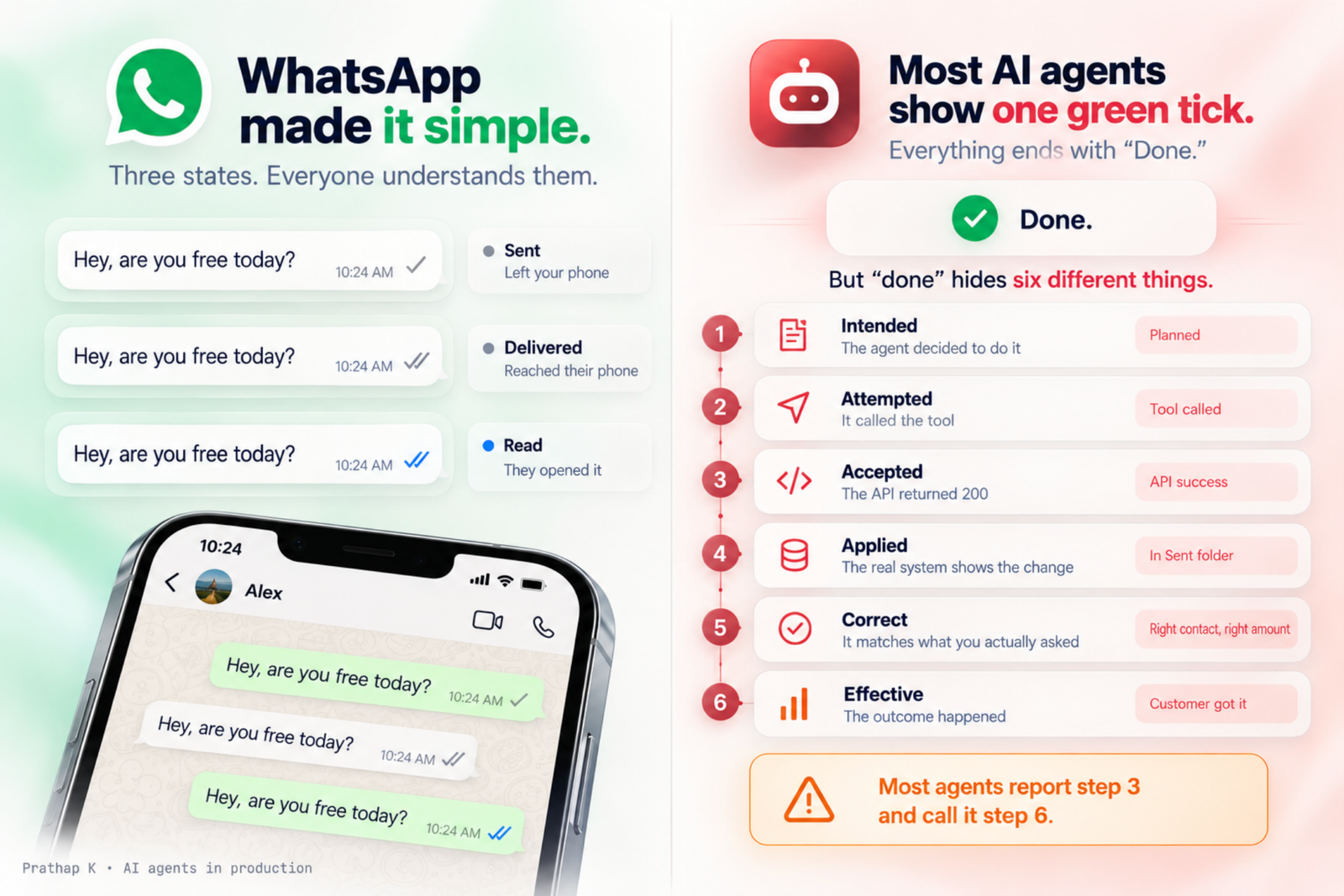
WhatsApp solved a problem most AI agents still haven't.
One grey tick: sent. Two grey ticks: delivered. Two blue ticks: read.
Three states. Nobody has to explain them. My parents understand them. You know exactly where your message is without asking anyone.
Now look at most AI agents. You ask one to send an email, update a CRM record or book a slot, and it comes back with one green tick and one word: "Done."
That one word hides six very different things.
The ladder
When an agent says it did something, it could mean any of these:
- Intended. The agent decided to do it. Nothing has happened in the world yet.
- Attempted. It called the tool. The request left your system.
- Accepted. The API returned 200. The other side received the request.
- Applied. The real system shows the change. The email is in the Sent folder. The row exists in the database. The calendar has the event.
- Correct. The change matches what the person actually asked for. Right contact, right amount, right thread.
- Effective. The outcome happened. The customer got the email. The payment cleared. The person showed up.
Most agents report step 3 and call it step 6.
That gap is where every "it said it sent the email" story comes from.
Why step 3 feels like the end
When you build an agent, the tool call is the last thing your code sees. The function returns, the status is 200, there's an id in the response, and the trace shows a green step. From inside the agent, that is the end of the story.
But a 200 only means the other system accepted the request. It doesn't mean:
- the mail actually left the outbox,
- a workflow rule didn't overwrite your CRM value a second later,
- the calendar didn't silently drop an attendee it couldn't match,
- the message went to the person you meant.
I wrote about the first half of this in a 200 OK is not proof your agent did the work. That post got a long discussion on Reddit, and a few people in that thread pushed the idea further than I had. This post is the version I use now.
What each step needs as proof
The useful part of the ladder is that each step has a different kind of evidence. If you can't name the evidence, you're not at that step.
| Step | What proves it |
|---|---|
| Intended | The plan or the tool choice in the trace |
| Attempted | The outgoing request in your logs |
| Accepted | The response code and id from the API |
| Applied | A fresh read from the real system, not from the agent's memory |
| Correct | That read compared against the original request |
| Effective | A signal from the outside world: delivered, paid, replied |
Steps 1 to 3 are cheap. You get them for free from your logs.
Step 4 is where most of the value is. It costs one extra read, and it catches most of the silent failures.
Step 4: read it back from the real place
The rule I follow: an agent is only allowed to say "done" after it has read the result back from the system it changed.
- Sent an email? Check the Sent folder or the provider's message status, not the id the send call returned.
- Updated a record? Fetch the record again after a short delay. Workflow rules love to run a second later.
- Booked a meeting? Read the event and check the attendee list.
Today I had 18 WhatsApp follow-ups going out. Each one was checked in the chat for its tick, sent or delivered, before it was marked finished. It's boring. That's the point. Boring checks are what make an agent trustworthy enough to leave alone.
Step 5 is the sneaky one
This one came from a comment on Reddit, and it changed how I build these checks.
A read-back compares the system against what the agent planned to do. If the agent picked the wrong person from the CRM, the email goes to the wrong person, the read-back matches the plan, and the action gets marked as verified.
Everything passes. Everything is wrong.
So the second check compares the result against the original request, not the agent's plan:
- Is this the contact the person named?
- Is this the amount they asked for?
- Is this the thread they were talking about?
For anything that sends, pays or deletes, I want both checks. The cost is a few lines of code. The cost of skipping it is an apology email to the wrong customer.
Step 6 is mostly out of your hands
You can't force someone to read a message or pay an invoice. An agent can't promise step 6.
But it can be honest about where it stopped. That is the real fix: stop collapsing six states into one word.
Instead of "Done", the agent says what it actually knows:
- "Accepted by the mail API" (step 3)
- "In your Sent folder" (step 4)
- "Sent to Dana from Acme, the one you mentioned" (step 5)
- "Delivered" or "Paid" when a webhook confirms it (step 6)
That's exactly what WhatsApp does with its ticks. It never claims more than it knows.
A small checklist
If you're building an agent that takes real actions, these are the questions I'd ask:
- Which step does my agent actually stop at today?
- For every write, is there a read-back from the real system?
- For anything that sends, pays or deletes, is the result checked against the original request?
- Does the status the user sees use an honest word, or just "done"?
- When a read-back fails, does the agent stop and say so, or does it retry blindly and risk doing the thing twice?
None of this needs a new framework. It needs the agent to stop at the right word.
The short version
"Done" is six states: intended, attempted, accepted, applied, correct, effective.
Most agents report the third and call it the sixth. Read back from the real system, compare against what was asked, and let the agent say exactly where it stopped.
Your chat app already does this. Your agent can too.
If you've built agents that take actions, I'd like to hear which step yours stops at, and what broke when it didn't. I'm on X as @devprathapk.